DELL RCM7N Optiplex Micro Desktop Chassis 3020
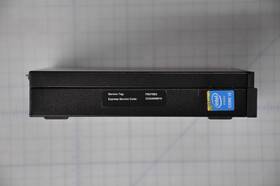
( Brand: Dell ), ( Manufacturer Part Number: RCM7N ), ( Type: Only Chasis )
Review DELL Optiplex Micro Desktop Only Case Chassis Used
The Dell OptiPlex 3020 Micro Desktop Chassis (model RCM7N) is a compact yet powerful business-class workstation designed to deliver high performance in a space-efficient, space-saving form factor. Engineered with Dell s signature reliability and efficiency in mind, this micro chassis is ideal for small offices, home offices, or any environment where desk space is limited without compromising on functionality. Measuring just 1.75 inches in height and featuring a sleek, minimalist design, the OptiPlex 3020 Micro seamlessly integrates into any workspace while offering robust processing capabilities. At its core, this chassis supports Intel s 4th or 5th generation Core processors (depending on model), ensuring smooth multitasking, efficient data processing, and compatibility with demanding applications from office productivity suites to light content creation or virtualization tasks. The compact yet well-ventilated design ensures adequate airflow, preventing overheating even during extended use, while its energy-efficient components help reduce operational costs over time.
The OptiPlex 3020 Micro is built with business-grade durability, featuring a sturdy metal chassis that protects internal components while maintaining a lightweight profile. Its modular design allows for easy upgrades, with support for up to 16GB of DDR3L RAM (expandable via two SO-DIMM slots) and a variety of storage options, including SATA SSDs or HDDs, providing flexibility for users with varying storage needs. The chassis also includes a dedicated mini-PCIe slot, enabling the addition of wireless connectivity (such as Wi-Fi or Bluetooth) or other low-profile expansion cards, further enhancing its versatility. Security-conscious users will appreciate features like a Kensington lock slot, ensuring physical protection against theft or unauthorized access, while the integrated VGA and HDMI ports (depending on the model) offer seamless connectivity for multiple displays, catering to both single-user and collaborative work environments.
Beyond its technical specifications, the Dell OptiPlex 3020 Micro is designed with user convenience in mind. Its compact footprint makes it an excellent choice for shared workspaces, conference rooms, or even under-desk installations where traditional desktop towers would be impractical. The chassis is also compatible with Dell s suite of business-class peripherals, including keyboards, mice, and monitors, ensuring a cohesive and optimized computing experience. Whether deployed in a corporate setting for employee workstations or in a home office for remote professionals, the OptiPlex 3020 Micro delivers a balance of performance, reliability, and space efficiency, making it a practical and future-proof investment for organizations seeking a durable yet unobtrusive computing solution.
### **Pros and Cons of buying a Dell RCM7N OptiPlex 3020 Micro Desktop Chassis**
#### **Pros:**The Dell OptiPlex 3020 Micro (RCM7N chassis) is a compact, business-oriented desktop designed for reliability, efficiency, and scalability. Its key advantages include:
1. **Space Efficiency** The micro form factor is ideal for small offices, home offices, or workspaces with limited desk space. It occupies minimal footprint while still offering full desktop performance.
2. **Energy Efficiency** The system is ENERGY STAR certified, meaning it consumes less power than traditional desktops, reducing electricity costs and environmental impact.
3. **Reliability and Durability** Dell s OptiPlex line is known for its robust build quality, long-term stability, and resistance to overheating, making it suitable for continuous use in office environments.
4. **Scalability and Upgradability** The RCM7N chassis supports multiple configurations, including:- Up to **32GB of DDR3L RAM** (expandable via additional slots).
- **SATA and M.2 SSD/HDD support** (depending on model), allowing for future storage upgrades.
- **PCIe expansion slots** (if configured with a compatible motherboard), enabling additional peripherals like Wi-Fi cards or dedicated GPUs.
5. **Quiet Operation** The compact design and efficient cooling help minimize noise, which is beneficial in shared office spaces.
6. **Business-Grade Features** Includes features like **Dell s ProSupport diagnostics, BIOS security controls, and compatibility with enterprise software**, making it a solid choice for small businesses or IT-managed environments.
7. **Affordability** Compared to full-tower desktops, the OptiPlex 3020 is often priced competitively, offering good value for its performance and features.
8. **Compatibility with Dell s Pre-Built Systems** The RCM7N is part of Dell s modular OptiPlex lineup, meaning it can be paired with Dell s pre-configured motherboards, CPUs, and peripherals for a seamless setup.
---
#### **Cons:** While the OptiPlex 3020 Micro is a strong choice, it does have some limitations:1. **Limited Expansion Options** Due to its micro form factor, the chassis lacks full-size expansion slots (e.g., no standard PCIe x16 for high-end GPUs). This restricts its use for gaming, video editing, or heavy workloads requiring dedicated hardware.
2. **Outdated Technology** The OptiPlex 3020 series uses **DDR3L RAM and SATA/SATA Express storage**, which is now considered outdated compared to modern DDR4/DDR5 and NVMe SSDs. This may limit future-proofing for demanding applications.
3. **Cooling Constraints** The compact design can lead to **higher internal temperatures** under heavy loads, potentially requiring additional cooling solutions (e.g., external fans) if running resource-intensive tasks.
4. **No Built-in Wi-Fi (in Base Models)** Many configurations lack integrated Wi-Fi, requiring an additional PCIe card for wireless connectivity, which adds cost and complexity.
5. **Limited GPU Support** Even with PCIe slots, the OptiPlex 3020 is not designed for high-end GPUs. Users needing graphics performance (e.g., for CAD or gaming) may need to pair it with a low-end GPU, which still won t match the capabilities of a full desktop tower.
6. **Software and Driver Compatibility** Some newer applications or games may not optimize well for older Intel CPUs (e.g., 4th/5th Gen Core) found in the 3020 series, leading to potential performance bottlenecks.
7. **Resale Value** Like most business-grade hardware, the OptiPlex 3020 does not hold its value well over time, making it less appealing for resale compared to gaming or high-end workstations.
8. **Power Supply Limitations** The included power supply may not be as efficient or high-quality as those in premium desktops, which could affect reliability in long-term use.
---
### **Conclusion:** The **Dell RCM7N OptiPlex 3020 Micro Desktop Chassis** is an excellent choice for:- **Small offices, home offices, or shared workspaces** where space efficiency and reliability are priorities.
- **Business users** who need a stable, low-maintenance system for office tasks (word processing, web browsing, light accounting, etc.).
- **Budget-conscious buyers** who want a Dell-branded system without the cost of a full tower.
- **Users who plan to upgrade RAM and storage** but do not require high-end graphics or expansion.
However, it is **not ideal** for:- **Gamers or content creators** needing powerful GPUs or high-end processing.
- **Users running future-proof applications** that require DDR4/DDR5 or NVMe storage.
- **Those who need extensive PCIe expansion** (e.g., multiple GPUs, high-speed networking cards).
- **Heavy-duty workloads** (e.g., 3D rendering, video editing) that demand high cooling and power efficiency.
---
### **Recommendation:** **Buy the Dell RCM7N OptiPlex 3020 Micro if:**- You prioritize **compact size, reliability, and business-grade performance** over raw power.
- Your use case involves **office productivity, light multimedia, or basic computing tasks**.
- You plan to **upgrade RAM and storage** but do not need high-end graphics.
- You prefer **Dell s support and warranty** for a long-term business or personal workstation.
**Avoid the Dell RCM7N OptiPlex 3020 Micro if:**- You require **gaming, 3D rendering, or high-performance computing**.
- You need **modern RAM (DDR4/DDR5) or NVMe storage** for future-proofing.
- You anticipate **heavy workloads** that may push the system s cooling limits.
- You want **extensive expansion options** (e.g., multiple GPUs, high-speed networking).
**Alternatives to Consider:**- For **gaming or high-end workstations**, opt for a **full-tower desktop** (e.g., Dell XPS Tower, HP Z Series, or custom-built systems).
- For **modern business use with better upgrade paths**, look at newer **OptiPlex 7000/9000 series** (if available) or **Lenovo ThinkCentre** models.
- For **ultra-compact, high-performance setups**, consider **mini-ITX motherboards** paired with a full-tower case for better cooling and expansion.
Details:
Blind Shipping on request. DELL OptiPlex 3020 Micro Desktop Only case Chassis used RCM7N, Check to see if this part is compatible with your system before purchasing. 14-day DOA Warranty.
part #: rcm7n prices
- $7.95-$58.00
specifications rackmountcasee:
- brand: Dell
- mpn: Rcm7n
- type: Only Chasis
shipping rackmountcasee:
- class: Economy
- type: Fixed
- transit: 5-12 Days
- service: Economy, Economy with Adult Signature required
- cost: $0.00
payments rackmountcasee:
- wallet: Google-pay
- credit card: Diners-club
- other
offer rackmountcasee:
- availability: In Stock
- options: Ship-to-home
- best offers: True
- sold: 0
- quantity: 2
- started: May 8, 2026
general rackmountcasee:
- condition: Used
- Enterprise Networking, Servers > Racks, Chassis Patch Panels > Rackmount Cases Chassis
seller rackmountcasee:
- # reviews: 16042
- city: Hollywood, Florida
- rating: 99.6%
returns rackmountcasee:
- method: Money back
- policy: Returns Accepted
- paid by: Buyer
- time: 30 Days
Dell RCM7N Is Similar To:
- 04whnw Dell Poweredge Rack Enclosure Hardware Kit Only (24.3% similar) Some items listed as new may have been opened to take pictures. As pictured: cable hangers, cage nuts, bolts and washers, installation guide prompt, free USPS priority shipping. Most every item is shipped free. Will likely be shipped via ups ground. Dell power edge rack enclosure hardware kit - only...(February 28th, 2018)
- 0vtr4r Dell Poweredge Server Cable Rack Management Arm Kit Used (32.3% similar) Dell DP n 0VTR4R 1u power edge server cable rack management arm kit used in excellent condition...(April 12th, 2018)
- 1v92t Dell Optiplex Xe 486 (36.8% similar) Dell optiplex Xe 486 metal wall mount bracket w screws 1V92T 01V92T...(October 1st, 2017)
- 225-3129 Dell Poweredge Chassis Only No Ram Hd Processor Single Ps (28.3% similar) No further testing was completed. No processor, ram or hard drives are included. Dell power edge R520 chassis only no ram, HD, processor single PS the item for sale is used in good cosmetic condition see pictures upon inspection I noticed type of scuffs, dings and scratches that happen with normal ...(April 2nd, 2018)
- 23pkm 023pkm Cn-023pkm Dell Rackmount Lcd Monitor Console Keyboard Oem Chassis New (42% similar) ...(August 28th, 2018)
- 94421-01 Dell Equallogic Ps Series Data Storage Array Chassis Only (37.8% similar) Cosmetics: the cosmetic condition overall is good showing moderate signs of previous use. Function: this data storage array has been tested and found to be in good working condition. The unit does not have any hard drives or drive trays and is also missing front face cover. The unit on start up does...(August 10th, 2018)
- Bmx01 Lot Of Dell Poweredge Blade Server Chassis Psu (31.9% similar) ...(September 6th, 2018)
- C5810 Dell Used 4210 42u (21.2% similar) Check the pictures and whats included for details. Save central operates this outlet store. Actual product will vary. Product specs model number C5810PRODUCT name Dell C5810 4210 42U rack enclosure enclosure rack height 42UFRONT door single panel rear double doors IDE panels not included top panel...(April 13th, 2017)
- Cgtx5 Dell Sff Cto Chassis Motherboard (36.4% similar) Pictures are of actual product. Dell R330 FSF for next day shipping options. GSR veers 823 gs please for next day shipping options...(July 9th, 2018)
- Cn-01v92t 01v92t Cn-01v92t Dell New Optiplex 769526719048 (28.8% similar) ...(March 20th, 2017)
- Cp4fg Dell Poweredge Server Barebone Empty Case Metal Chassis Board Cable (35.8% similar) Dell power edge R430 server bare bone empty case metal chassis board cable CP4FG...(March 8th, 2018)